How to skip an approver on small requests?
"Is there a way to make signatures a choice?"- Google Docs Editors Community
This is a common question when not every request needs every signature. If you send check requests through a manager and the CEO, a small one shouldn't sit waiting for the CEO, but a large one still needs that signature. When every signature is required, a $40 request waits in the same line as a $4,000 one.
In this article, we will show you how to make the CEO's signature optional, so that a small check request finishes without waiting for the CEO.
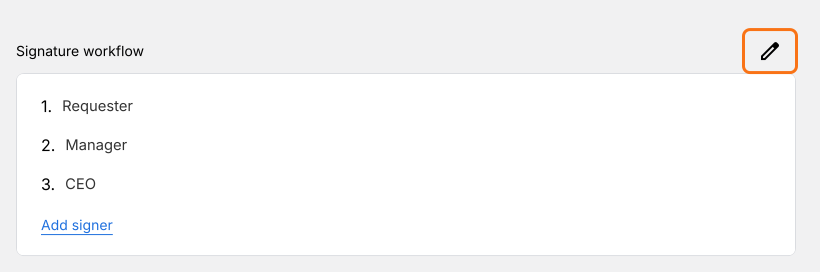
1. Open the signer list
In the EDIT tab of your check request, scroll to Signature workflow and click the pencil. If you're starting new, click Import Google Form and add your signers first.
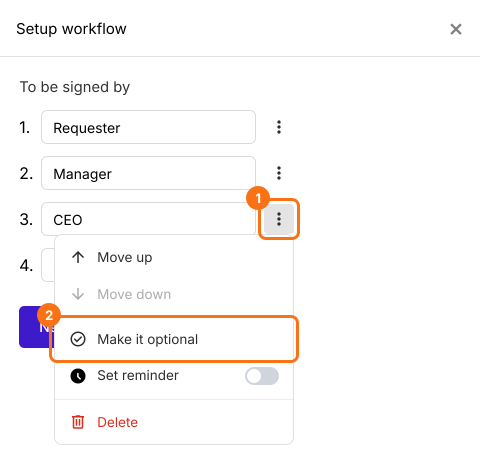
2. Make the CEO optional
Click the three dots beside CEO and choose Make it optional. An Optional badge shows beside CEO.
3. Leave the CEO's email empty on small checks
After signing, the requester sees Enter approver emails. They decide by the amount: leave CEO email empty for a $40 check, or fill it in for $4,000.

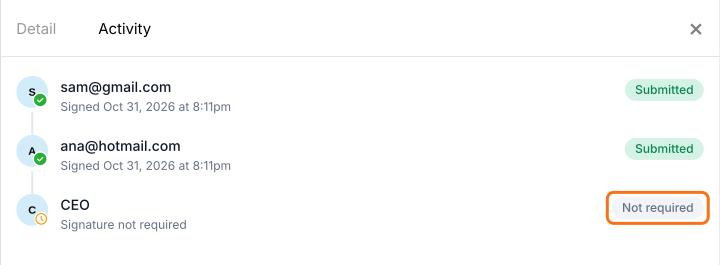
4. The check request finishes without the CEO
The CEO gets no email. In Activity, they show as Signature not required, and the card says Signed and completed once the manager signs.
Summary
If every check request has to wait for the CEO, a $40 check sits in the same line as a $4,000 one. With Formesign, you make the CEO's signature optional. The person filling in the request leaves the CEO's email empty on small checks, and the request finishes without waiting.
Last updated: