How to let people choose their approver?
"How to allow user to choose who Approval should go to"- Google Docs Editors Community
This is a common question when a request has to go to a different approver each time. If you run a leave request in Google Forms, each employee has a different manager, and the request has to reach the right one before the leave starts. Google Forms only notifies its owner and editors, and keeping one form per manager is a lot of upkeep.
In this article, we will show you how to share one leave request link, so that each employee sends their request to their own manager.
1. Import your leave request
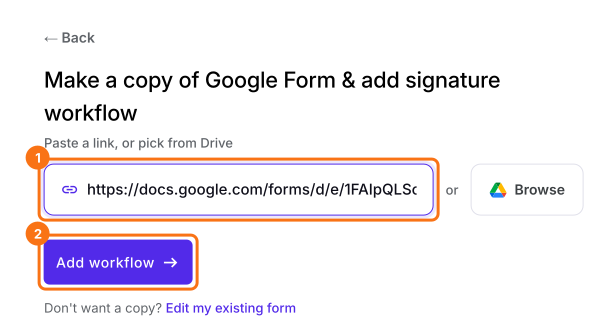
Click Import Google Form, paste your leave request's link and click Add workflow.
2. Add the approver as a role
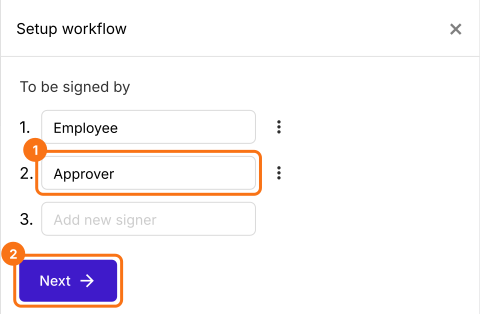
Under To be signed by, type Employee and Approver, then click Next. You type a role here because the manager changes from one employee to the next.
3. Share the link
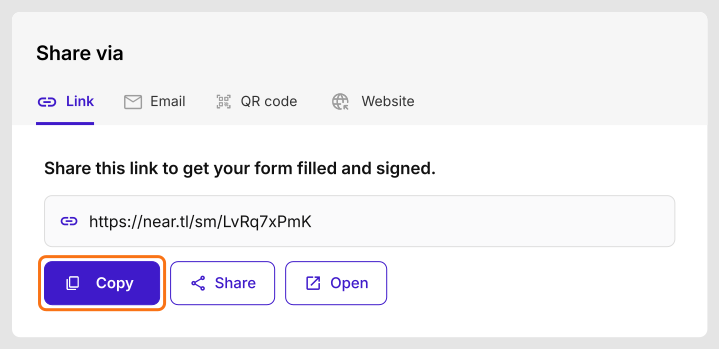
Open the SHARE tab, click Copy and send the link to your staff.
4. They enter who approves
After signing the leave request and clicking SUBMIT, the employee sees Enter the approver's email. They type their manager's email and click Proceed.

5. Their manager gets the request
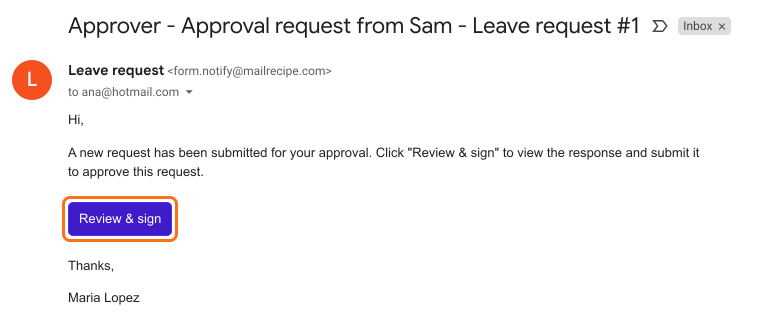
The manager gets this email and clicks Review & sign. They read the employee's answers and sign.
Summary
If each employee's leave request has to reach a different manager, Google Forms can't send it there, and one form per manager is too much upkeep. With Formesign, you share one link, each employee enters their manager's email after signing, and that manager gets the request to sign.
Last updated: